DigUp finds “a dog on the beach” on your computer: why your site search should search by meaning
 Alexandre Suon·9 min read·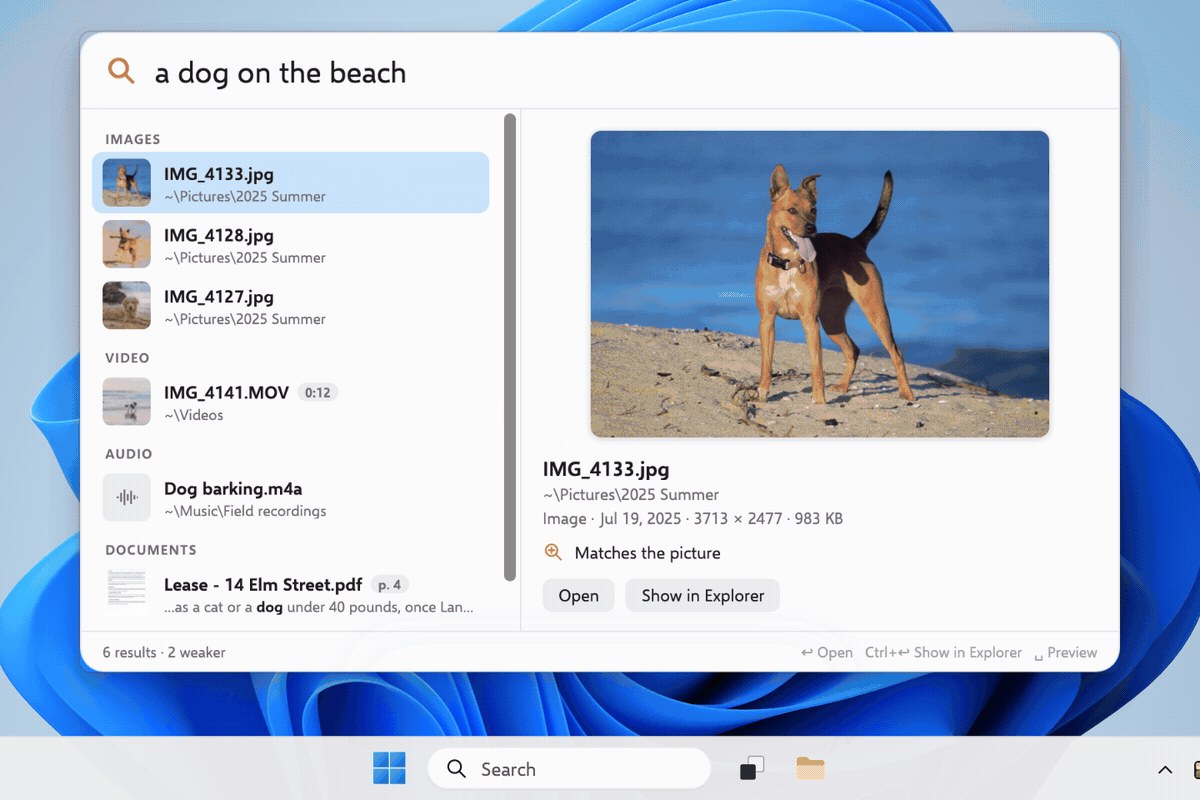
A free app finds a photo, a PDF page or a moment in a video from a plain description. What it says about your customers' expectations, how search by meaning works, and how to test your site search.
In this articleShow all sectionsHide
30-second summary
ShowHide ⌄
- DigUp is a free, open-source app that searches the content of your files, not their names: photos, PDFs, documents, audio, video.
- It runs on EmbeddingGemma 2, an open model from Google DeepMind with 740 million parameters, small enough to run on a laptop.
- Everything stays on the computer: according to the project, nothing you index leaves the machine.
- The lesson for e-commerce: customers are getting used to describing what they want, and being understood.
- Site search is measured and tested like a funnel: zero-result queries, clicks, add-to-carts.
Section 1 · The tool
DigUp searches what your files show, not what they are called
DigUp is a free, open-source app for Mac, Windows and Linux. Its promise fits in one line: “Describe it. Dig it up.” You describe what you are looking for, and the app finds it.
Type “a dog on the beach” and DigUp returns the photos that show a dog on a beach, even if they are called IMG_4133.jpg. Type “the clause about pets in the lease” and it opens the PDF at the right page. It works for audio recordings and videos too, which it opens at the right moment.
The app also finds exact strings, such as an invoice number or an error code. It combines both: meaning and exact words.
Section 2 · How it works
Searching by meaning means comparing positions on a map
Classic search compares words. If a customer types “evening dress” and the product page says “long cocktail dress”, there is no exact match, and the engine may return nothing.
What is an “embedding”? An AI model turns each text, image or sound into a list of numbers that represents its meaning. Two pieces of content with similar meaning land close together on this “map”, even if they share no words. Searching then means finding the points closest to the query.
- 1IndexThe app reads your files and computes where each one sits on the map of meaning.
- 2Translate the queryYour sentence is placed on the same map, with the same model.
- 3RankThe closest files come first, with a boost for exact words.
- 4Open at the right spotThe PDF page, the moment in the video, the line of code.
The model, EmbeddingGemma 2, is an open model from Google DeepMind. It puts text, images, audio and video in the same space, so one query can compare a video frame with a PDF page. It has 740 million parameters, which the project describes as “small enough to run on a laptop”.
Section 3 · On device
Everything runs on the machine, with no account and no file upload
According to the project, nothing you index leaves the computer. The app only goes online to download the model once and to check for updates once a day, a check that sends nothing about your files and can be turned off. There is no account and no telemetry.
| Point | What the project says |
|---|---|
| Files | Photos, PDFs (including scans), documents, audio, video, optional code |
| Model | EmbeddingGemma 2 (Google DeepMind), 740 million parameters |
| Platforms | Mac (Apple Silicon), Windows and Linux in beta |
| Privacy | Local indexing, no account, no telemetry |
| License | MIT, free and open source |
Why an open model changes the game An open model can be downloaded and used freely, including by a small team. What used to require a big AI project becomes a building block. The same is true for e-commerce site search.
Section 4 · Your customers
Your customers will expect the same from your site search
When computers, phones and assistants understand a description, customers get used to writing the way they speak. “Dress for a summer wedding”, “sofa that fits in a studio”, “gift for a dad who loves cooking”.
On many sites, these queries still return “no results”, or an unrelated list. Yet a customer who uses the search bar often knows what they want: a high-intent visitor. Losing them there is expensive.
“Your customers are getting used to being understood. Your site search is still looking for words.”
Section 5 · Measurement
Site search is measured like a funnel
- 1Query typedThe sentences your customers really write, in full, typos included.
- 2Results shownShare of queries that return zero results or off-topic results.
- 3Product clickShare of searches followed by a click in the first results.
- 4Add to cart and orderWhat searching visitors bring in, compared with those who don't search.
This data often already exists in your analytics tool, as long as search is properly tracked. Start with the list of zero-result queries: it is the list of what your customers want and cannot find.
Section 6 · What to test
Start with the lost queries, then test
- Export zero-result queries from the last 90 days and sort them by volume.
- Read the top 50: synonyms, usage descriptions, typos, sizes and colours.
- Fix the easy wins fast: synonyms, redirects, an empty results page that suggests alternatives.
- Test search by meaning on part of the traffic, with a control group, rather than switching everything at once.
- Judge on revenue, not only on click rate: more relevant results should show up in orders.
Key terms
ShowHide ⌄
- Search by meaning (semantic search)
- Search that compares the meaning of a query and of content, not only their words.
- Embedding
- A list of numbers that represents the meaning of a text, image or sound. Content with similar meaning has similar embeddings.
- Open model
- An AI model whose weights are published and can be downloaded and used freely, under its license.
- Zero-result query
- A search that returns no product. One of the first metrics to track on site search.
- Control group
- A share of visitors who keep the old version. Comparing them with the rest measures the real effect.
Sources
ShowHide ⌄
Alexandre co-founded and runs Henkan & Partners. He decodes one e-commerce story every day on LinkedIn.
Follow Alexandre ↗